
Let me start with a collector confession on why I got the CLZ Comics App.
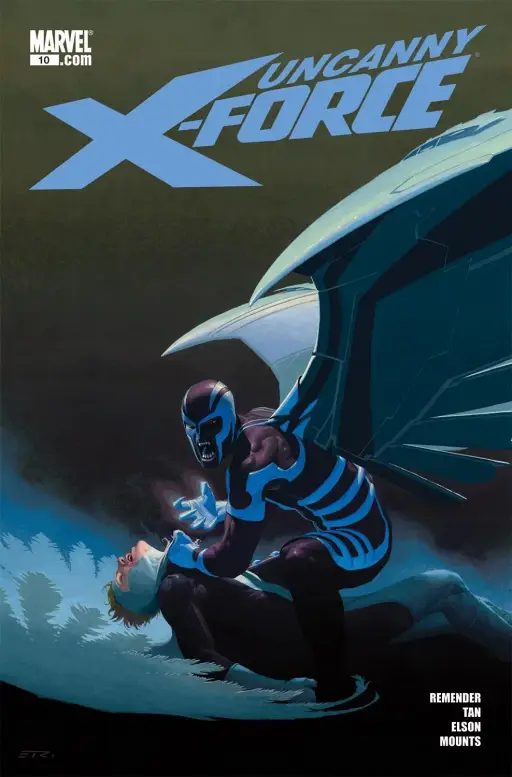
Two years ago, I came home from my Local Comic Shop with a small stack of back issues. I cracked open my shortboxes to file them away, only to realize I already owned Uncanny X-Force (2010) #10 (created by writer Rick Remender and artist Jerome Opeña). Not only did I own it, but I also owned the exact same cover.
I had paid for a book I already had bagged and boarded, just because my “database” was my unreliable memory and a spreadsheet I hadn’t updated since 2020.
I was tired of buying duplicates and losing track of what was in which box, so I finally surrendered to the CLZ Comics app.
In my Comic Book Storage Ideas guide, I talked about how to physically protect your books. But physical storage is useless if you don’t actually know what you have in those boxes.
This isn’t a sponsored tech review. This is how I actually use CLZ Comics to keep my collection brain in my pocket so my physical boxes don’t devolve into chaos.
What CLZ Comics App Actually Is (In Human Terms)
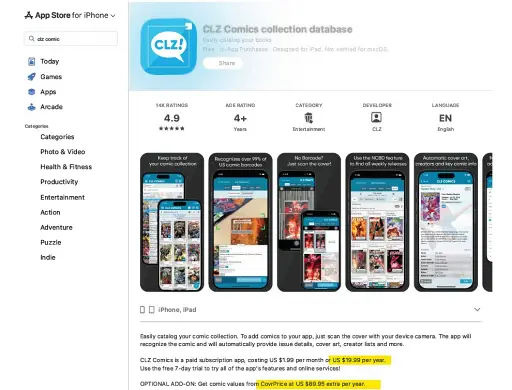
At its core, CLZ Comics is a massive database on your phone (available for iOS and Android) and computer. You scan the barcode on your comic, and the app automatically pulls in the series, issue number, cover art, publisher, and creator credits.
It is subscription-based, running about $20 (please check the latest price at Apple App Store) a year depending on your platform and region, though they offer a free trial. I usually hate subscriptions. But if it stops me from buying even two duplicate back issues a year, it literally pays for itself.
How I Set CLZ Comics App Up Without Losing My Mind
Do not pull every single comic out of your closet at once. You will burn out, hate the app, and hate yourself.
I did it box by box. For modern books, the process is stupidly fast: open the app, point your camera at the barcode, and CLZ fills in the blanks. For older or oddball books without barcodes, you just search by title and check off the issues you own.
I hate data entry. But once you get through the initial heavy lift of scanning your boxes, maintaining your collection is effortless.
Daily Use: At the Shop and in the Closet
Here is how the app actually fits into my life:
- At the LCS: I do not buy back issues or variants without checking my phone anymore. You search the app, and if you already own it, you put it back on the shelf. This is the stop buying duplicates feature, and it is flawless.
- Mail-Days: When an online order arrives, I scan it immediately. I tag it with the physical Storage Box field in the app so I remember exactly where I put it.
- In front of the boxes: When I am looking for a specific storyline buried in my closet, I use CLZ to group my collection by Storage Box. The app mirrors my physical system. I don’t dig; I just go to Box 4.
Power Features That Actually Matter
CLZ Comics App has a lot of features, but these are the only ones I genuinely care about:
- The Wish List: You can add missing issues to a dedicated want-list. When you are at a convention digging through longboxes, you can filter by series and know exactly what you are hunting for.
- Grading and Slab Fields: There are dedicated fields for grade, grading company (CGC, CBCS), slabbed vs. raw status, and whether the book is a key issue.
- Cloud Sync: Your collection syncs to the CLZ Cloud. If you drop your phone in a puddle, your catalog is safe.
A Quick Note on CovrPrice Premium
CLZ Comics App has a highly publicized integration with CovrPrice. If you link them, CLZ pulls in live market values for your raw and slabbed books right into the app. On paper, that is amazing.
In practice, CovrPrice Premium is another subscription on top of CLZ (roughly $90 a year depending on your plan).
Do I use it? No. I’m not day-trading my collection. I mainly use CLZ Comics App to track what I own, know which box it’s in, and show off my wall of Batman to non-collectors who already think I have a problem. For that, the base CLZ subscription is plenty.
Who should subscribe to CovrPrice? If you are actively buying hot keys, flipping variants on eBay, or you really care about watching your collection’s value move week-to-week like a stock portfolio, the integration is phenomenal. Just know you are paying for pricing data, not for cataloging. If you’re mostly reading, hoarding, and waiting for retirement, skip CovrPrice and just use CLZ.
The Verdict
If you have more than two shortboxes, or if you actively hunt for back issues, the CLZ Comics app is essential. It is widely considered the best comic tracking app out there, and for good reason.
If you are perfectly happy with a free spreadsheet and never accidentally buy the same issue twice, stick with your spreadsheet. But for the rest of us, it is the best $20 a year you can spend on your collection.
My Advice: Download the 7-day free trial. Pick exactly one shortbox this weekend. Scan it. If you like the feeling of having your collection in your pocket, upgrade to the paid version and never buy a duplicate again.
