
iPads remain one of the most popular ways to read comics digitally. They offer strong app support, consistent performance, and screens that handle detailed artwork and text well.
But not every iPad is ideal for comics. Screen size, weight, and comfort matter more than raw processing power. This guide breaks down which iPad models work best for reading comics, and how to choose the right one based on how you read.
If you’re still deciding between tablets in general, you may want to start with our broader guide to the best tablet for reading comics, which compares iPads with Android options.
What Makes an iPad Good for Reading Comics?
Before choosing a model, it helps to understand what actually affects the comic-reading experience.
Screen size and comfort
Comics are highly visual. An iPad needs to be large enough to display full pages clearly, but not so large that it becomes tiring to hold.
For most readers, 10–11 inches is the sweet spot.
Display quality
All modern iPads have sharp displays, but differences show up when reading:
- dense dialogue
- older scanned comics
- black-and-white manga
Consistent brightness and color accuracy matter more than peak resolution.
App support
iPads work seamlessly with major comic platforms, including:
- Marvel Unlimited
- DC Infinite
- Kindle / ComiXology alternatives
If you rely heavily on these apps, iPadOS remains the most stable ecosystem.
Battery life
A good iPad should handle:
- long binge-reading sessions
- offline downloads
- travel reading
Most current iPads comfortably meet this requirement.
Best iPad Models for Reading Comics
Instead of focusing on model years, this guide looks at iPad classes that consistently deliver a good comic-reading experience.
iPad Air (10–11″ class) – Best Overall
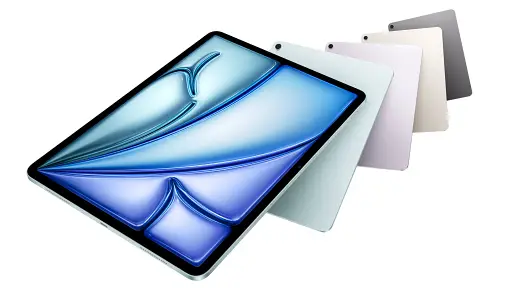
Best for: Most comic readers
The iPad Air offers the best balance of:
- screen size
- weight
- performance
- long-term software support
Its display is large enough for full comic pages without frequent zooming, while still being comfortable for extended reading sessions.
For most people, this is the safest and most versatile choice.
Check current iPad Air pricing on Amazon.
iPad Mini (8″ class) – Best for Portability

Best for: One-hand reading and travel
The iPad Mini is small, light, and easy to hold. Many readers enjoy it for:
- manga
- casual reading
- commuting or travel
The trade-off is page size. Splash pages feel smaller, and some readers may need to zoom more often.
View iPad Mini options on Amazon.
Standard iPad (11″ class) – Best Value Option
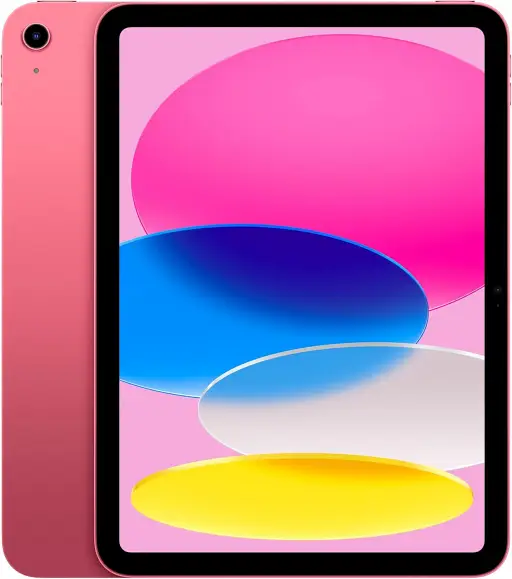
Best for: Budget-conscious readers
The standard iPad delivers:
- solid screen size
- excellent app compatibility
- lower cost than premium models
It’s a strong entry point for readers new to digital comics or those upgrading from phones.
Check current iPad (standard) pricing on Amazon.
iPad Pro (12–13″ class) – Best for Immersion
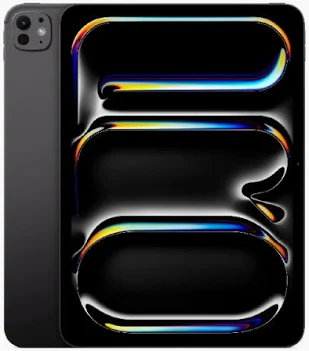
Best for: Desk or couch reading
The iPad Pro offers:
- very large display
- immersive artwork
- excellent brightness
However, it’s heavier and more expensive. For many readers, it’s more than necessary unless you prioritize maximum screen size.
Check current iPad Pro pricing on Amazon.
Which iPad Size Is Best for Reading Comics?
Choosing the right size makes a bigger difference than choosing the newest model.
- 8–9 inches: Portable, comfortable, but smaller pages
- 10–11 inches: Best balance for most readers
- 12–13 inches: Immersive but heavy
If you read a mix of Western comics, manga, and digital issues, 10–11 inches remains the best choice.
iPad vs Other Tablets for Comics
iPads excel at:
- app stability
- long-term updates
- consistent performance
That said, some readers prefer Android tablets for:
- file management
- AMOLED displays
- wider price range
If you want a platform comparison, our full guide to the best tablet for reading comics covers both options in detail.
Frequently Asked Questions On The Best iPad For Reading Comics
Is an iPad good for reading comics?
Yes. iPads offer excellent app support, sharp displays, and reliable performance, making them one of the best options for digital comics.
Is iPad Mini too small for comics?
It works well for manga and casual reading, but some readers find full comic pages feel cramped without zooming.
Do you need an iPad Pro to read comics?
No. For most readers, an iPad Air or standard iPad is more than sufficient.
Can you read comics offline on an iPad?
Yes. Most major comic apps allow offline downloads for reading without an internet connection.
The best iPad for reading comics depends on how and where you read.
For most people:
- an iPad Air-class device
- with a 10–11 inch screen
offers the best balance of comfort, clarity, and long-term usability. Check current iPad Air pricing on Amazon.
Smaller iPads suit portability. Larger ones suit immersion. You don’t need the most expensive option to enjoy digital comics properly.
Are You an Android User Instead?
If you prefer the Android ecosystem or want a travel-friendly OLED alternative to the iPad without the flagship price tag, check out our resident collector Juan’s hands-on review. He broke down his personal workflow in his piece: HONOR MagicPad 4 Review: The Tablet for Comics.
About This Guide
By ComicsDeck Editorial Team
This guide is part of our ongoing series of recommendations designed to help readers choose the right devices for enjoying comics digitally.
Disclosure: This article contains affiliate links. If you choose to buy through these links, ComicsDeck may earn a small commission at no extra cost to you.
